The Anatomy of Push Notifications: How They Really Work
I came back to my desk to find a thousand notifications for an organization I signed out of days ago piled up on my simulator… and they wouldn’t stop coming. Figuring out how to make them stop got me wondering how push notifications actually work.
If you’re ready to pull back the curtains on push notifications, you’ve come to the right place:
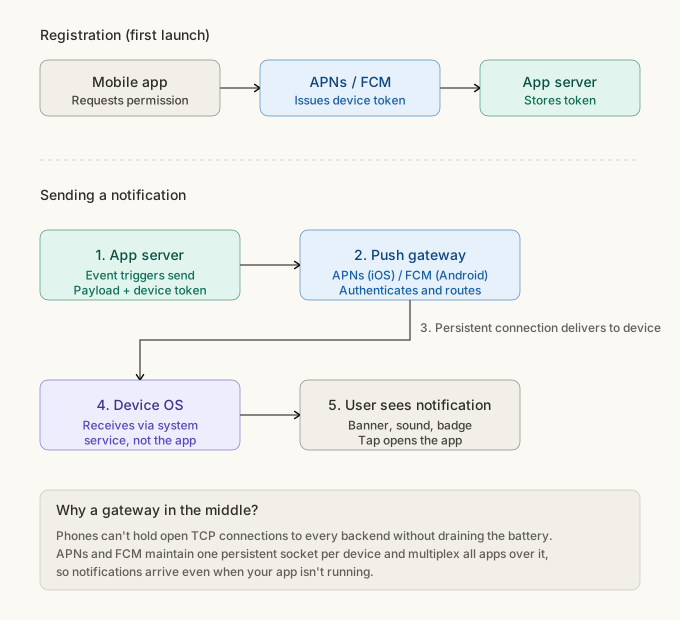
The registration handshake at the top only happens once, and the numbered flow below happens every time a notification fires.
Registration
Before anything can be sent, the backend has to know that the device exists and wants notifications. So, the first time the user opens the app, it asks for permission. Once granted, the OS reaches out to its push service, Apple Push Notification service (APNs) for iOS and Firebase Cloud Messaging (FCM) for Android, which issues a unique token to the device. Then, the app sends the token to the backend over HTTPS and the backend stores it alongside the user’s account. This token is like the device’s mailing address, and APNs and FCM are like the post office; every notification addressed to that token is delivered to the corresponding device.
Sending a notification
Once registration is done, every notification follows the same path. Say someone sends you a message in the app. The app’s backend builds a payload, looks up your device token, and fires off an HTTPS request to APNs or FCM saying “deliver this to that device.” Then it’s out of the backend’s hands.
Every device maintains a persistent connection to its push service — APNs or FCM — and every notification for every app on that device flows through it. The device can only afford to keep one socket open without draining the battery, so Apple and Google own it, and the OS routes incoming notifications to the right app based on the token.
When the notification reaches the device, the operating system handles the visible part: the banner, the notification tray, the vibration, the ding. The app doesn’t even need to be running. It’s only when the user taps the notification that the app gets involved, reading the payload (which usually contains something like a route) and navigating to the right screen.
All of this assumes the backend knows who should still be getting mail. Mine didn’t.
Back to logging out…
Remember that mailing address? It turns out knowing where to send notifications is only half the problem — you also need to know when to stop.
Our app was sending notifications to users for organizations they’d logged out of. The fix seemed obvious: just revoke the token on logout, that is, delete it from the database, and it becomes impossible for a push notification to be sent to the device.
The fix was just a few lines, so I implemented it in a few minutes and sent it to the QA engineer. He sent it back to me just as quickly, saying that now push notifications weren’t sending for users who logged out of one organization but stayed logged in to others.
Our app is multi-tenant, meaning that a user can have multiple accounts under one email, each associated with a different organization. They can be signed in to 0, 1, or several organizations at a single time. So when I revoked the token entirely, they would receive no notifications, even for the organizations they were still logged in to. But doing nothing unless they log out of all organizations means they could wrongly receive notifications for an organization that they logged out of.
The real fix was a bridge table linking device tokens to specific (user, organization) pairs:
device_org_tokens
  user_id       -- who the notification is for
  org_id        -- which tenant it's about
  device_token  -- which device to deliver to
  UNIQUE (user_id, org_id, device_token)
org_id is what fixed the original bug: when a user logs out of one organization, we delete just
that row, leaving the rows for their other orgs intact. The token still exists for the device,
but the link between this user, this org, and this token is gone.
device_token in the unique key handles the same user being signed into the same org on
multiple devices. Both devices get their own row, both receive notifications, and logging out on
one only removes that device’s row.
user_id ties it all to an account, so when someone logs out of everything we can drop all their
rows in one query.
When the backend sends a notification for an org, it queries the bridge table for matching (user, org) pairs and gets back every token that should receive it. No row, no delivery, even if the token is still alive and well for the user’s other orgs.
Beyond the happy path
Silent notifications: Silent notifications are a whole class of notification that never display to the user at all. APNs calls these “background” notifications and FCM calls them “data messages”. These notifications wake up the app while it’s still in the background so that it can sync data, update a badge, or prepare content before the user opens the app. This is why messaging apps like WhatsApp have new conversations loaded immediately upon open and why news apps are able to update the app badge count without any indication to the user.
Payload size limits: APNs and FCM cap payload size to 4KB, which is why apps typically send a lightweight notification and the app fetches the full content on tap or in the background. So if your app takes a second to load after you tap the notification, this is why.
Delivery is best-effort, not guaranteed: If the device is offline, APNs and FCM often only hold the most recent notification per app; push notifications aren’t a queue, and tend to work better as a hint to sync rather than a source of truth.
Wrapping up
Push notifications aren’t magic; they just feel that way until you see all the pieces. They’re a chain of boring protocols with one clever piece in the middle (the single-socket trick to avoid battery drain). Your backend talks over HTTPS with a gateway. The gateway owns a single socket on every device. The OS routes incoming messages to the right app. There’s no magic involved once you break it down.
And once you’ve realized it, you’ll start to see this pattern everywhere: iMessage, FaceTime, background sync, all running the same system with the same protocols. As I learned the hard way, a thousand notifications later.
Discussion
Loading comments...